Showing posts with label Tips n Tricks. Show all posts

Display Ad Networks for Small Publishers


Just starting out, or have a medium-sized audience? These display networks beyond AdSense can help you monetize.
  1. Advertising.com — Advertising.com combines the industry’s most advanced technology, precise targeting and a quality network to deliver results for advertisers & publishers. Publishers using this network include Boston.com, Laptopmag.com, and DIYnetwork.com.
  2. — BuySellAds allows publishers to list their ad inventory on their network to be discovered by advertiser in their niche. Publishers using this network include 9to5google.com, RunBlogger.com, and 1keydata.com.
  3. Chitika — Chitika sets itself apart with their pledge to only show ads to users when and where they want to see them. Publishers using this network include Used-Cars.info, Freebies4mom.com, and Binatani.com.
  4. IndustryBrains — IndustryBrains allows publishers to leverage their premium online content to generate additional revenue from contextually targeted ads that are consistent with your brand. Publishers using this network include Telecomsemea.net.
  5. Kontera — Kontera provides publishers with incremental advertising revenues and premium content syndication for their mobile or PC web pages. Publishers using this network include MajorGeeks.com, PracticalMachinist.com, and EventGuide.com.
  6. Media.net — Media.net brings contextual ads program from Yahoo! and Bing to publishers so they can create and customize ad units that display relevant text ads consisting of sponsored links and ad topics. This network is currently invite only.
  7. PulsePoint — PulsePoint owns one of the largest independent and fully transparent ad exchanges in the industry, allowing quality publishers to reveal and monetize the true value of their inventory. Publishers using this network include Gameshok.com, Salary.com, and FlashDriven.com.
  8. ValueClick Media — Conversant (formerly ValueClick Media) helps publishers maximize profits while keeping their costs down. Publishers using this network include Phys.org, AccessAtlanta.com, and Huffingtonpost.co.uk.

Display Ad Networks for Large Publishers

Got a significant-sized audience? These display networks can help you earn even more revenue from them.
  1. AdBlade — Adblade’s full suite of monetization solutions will help you grow revenue by attracting top advertisers, as well as help monetize inventory that’s not currently generating revenue. Publishers using this network include LAtimes.com, Audible.com, and AutoAnything.com.
  2. Tribal Fusion — Publishers who meet Tribal Fusion’s rigorous standards can expect to discover the benefits of partnering with them and maximize the value of their highly targeted content. Publishers using their network include Ranker.com, Cheapoair.com, and CDW.com.
  3. Vibrant Media — Increase incremental revenue with Vibrant’s native advertising placements. Publishers using their network include SparkPeople.com, NBCMiami.com, and Computing.net.

Content Monetization Networks

In addition to display ads, you can also monetize your content by simply recommending your audience visit other high-quality publications and products via text links. Here are a few networks that allow you to do this.
  1. Disqus — Disqus, the popular commenting platform, is working on Promoted Discovery, which will allow publishers using their comment platform to monetize their content as well.
  2. Outbrain — For publishers with high amounts of traffic, Outbrain allows you to generate revenue with links to high quality third-party content below the fold. Publishers using this network include CNN.com, DailyCurrant.com, and LAweekly.com
  3. Tabooola — Similar to Outbrain, Taboola targets publishers with high traffic to monetize with third-party links to high-quality content. Publishers using this network include Dumpaday.com, WickedLocal.com, and HeraldNews.com.
  4. VigLink — VigLink automatically pays you when people buy the brands and products you write about by automatically converting regular links into paid ones. Publishers using this network include Makeuseof.com, Rumorfix.com, and HypeLifeMagazine.com.

Email Monetization Networks

Have a huge mailing list and a high-quality newsletter? These networks will help you monetize it!
  1. LiveIntent — LiveIntent allows you to monetize your valuable newsletter inventory with offers and content in real-time. Publishers using this network include The Weather Channel, AOL, and The Wall Street Journal.
  2. NewsletterDirectory.co — Membership in NewsletterDirectory.co can help you monetize your email list by finding the right sponsors.

Video Monetization Networks

Are you a video publisher? While Google AdSense has cornered the market in YouTube revenue generation, there are other networks that allow you to monetize other types of videos. Here are a few to get you started.
  1. Adap.TV — Adap.tv allows you to open your inventory up to new sources of revenue by ensuring the highest possible CPMs for every impression.
  2. YouTube Partner Program — YouTube video creators can monetize their videos by joining the YouTube Partner Program, which offers CPC and CPM monetization with pre-roll video ads as well as in-video overlays.
  3. Videology — The Videology Addressable Media Platform enhances the yield on a publisher’s ad inventory by connecting the world’s leading marketers with your audience. Publishers using this network include Fool.com, Activebeat.co, and Gamewise.co.

Affiliate Networks

Affiliate networks allow you to find products that your audience will enjoy, promote them, and earn a commission off of them. When done the right way, you can earn significantly more with affiliate marketing than Google AdSense.
  1. Amazon Associates — Amazon Associates allows you to earn up to 10% commission by simply referring people to products you recommend on Amazon.
  2. ClickBank — As an affiliate on Clickbank, you will be able to promote downloadable products you’ve picked out from their extensive marketplace for your audience based on their interests.
  3. Commission Junction — Whether you are looking to make money online by monetizing your website or want to grow your existing affiliate business, CJ’s robust technology platform and proven expertise drive results.
  4. Rakuten Linkshare — Regardless of what type of site you have in mind (or already have in place!) as you build a loyal following you have an opportunity to monetize your website and start earning commissions!
  5. ShareASale — ShareASale hosts 3,900+ affiliate programs across 40 different countries in a wide range of categories of products beyond online or downloadable only.
Posted by Ghulam Ahmed Bin Saeed On 04:30 READ FULL POST
I know, I know… starting a blog can be confusing.when I started my first blog, I knew absolutely nothing about blogs or blogging. I kept searching for information and “how-to” guides on Google, but they all required technical skills and I found them extremely difficult to follow.

By now, I’ve built and managed more than 30 different blogs, and during that time, I’ve learned a ton about blogging.
All I can say is that creating blogs is extremely easy and it does not require any coding skills (HTML). In fact, the whole process is somewhat automatic. So whether you are 20 or 70 years old, doesn’t really matter – you can still make it. Here’s my sample blog, which I made in less than 20 minutes. You can do that too; simply follow the steps below.
If you are still hesitating, I suggest you read my article titled “Reasons why you should start your own blog.”
P.S.: If you get stuck while setting up your blog, get in touch with me and I’ll help you out.

Shall we start?

1) DECIDE WHAT YOU ARE GOING TO BLOG ABOUT

The first thing you need to do is pick a blog topic. Is there anything you enjoy or are really passionate about? If there is, then start a blog about it. When I started my first blog, I was really interested in smartphones and new tech gadgets, so I picked that topic. It makes no sense to start a blog about something you have no interest in, while it’s much easier to write articles and posts about topics that you’re passionate about.
It’s even better when you have been interested in a specific field or an industry for a long time, because you are already an expert. However, if you don’t have any idea which topic or niche you want to write about, think about your hobbies or just start blogging about your daily activities, memorable moments or simply about everything.
P.S. If you already know your blog niche or topic, you can skip this step and move onto Step 2.

2) DECIDE WHICH BLOGGING PLATFORM TO USE, FREE OR SELF-HOSTED?

First of all, most of the blogs on the internet are made using the WordPress blogging platform. In fact, WordPress has been downloaded over 65 million times and is used by many popular blogs and websites.
Here’s why I think using WordPress is the best way to start your blog:
  • You can choose from many different layouts and free themes
  • You can easily write blog posts and add pictures/images to your blog
  • You are able to categorize your blog posts and create a custom menu
  • People can comment and share your blog
  • etc…

Free is not FREE…

Yes, you can create a free blog on a blogger.com or tumblr.com, but they are not actually free. And let me tell you why…
You are not able to get your OWN domain – Instead, you will get a sub-domain. My blog (startbloggingonline.com) has its own domain, but if I had decided to start a blog on blogger.com (for example), then it would look like startbloggingonline.blogger.com – a bit clumsy, isn’t it?
They are lacking of different themes/layouts and plugins – In other words, your blog will look really blank and boring. If you want additional themes or plugins to customize your blog, you have to pay… a lot.
You have NO control over your blog – Your blog is hosted on another site, thus you are not the “owner” of this property. If moderators decide that your blog does not fit with their policies (which can happen quite often), they can actually delete your blog without any warnings. In short, all your hard work and time spent on the blog will be vanished within seconds.

You are not able to earn money via blogging – Yes, you CAN make money with blogging, lots of people are. However, If you ever decide to earn money with your blog, you are unable to do it on a free blog. They simply don’t allow you to do that. Even if they do, they want their own cut, which is usually 50%.
However, if you are on a budget and don’t plan to blog more than few months then definitely start with a free blog. A self-hosted blog on your own domain (yourblog.com) is by far the better option. It gives you full control over your blog and you’ll look more professional. It’s also a great choice for people who want to blog long-term, share their knowledge, become a blogger and earn some money from it.

WHAT IS THE COST OF STARTING A SELF-HOSTED BLOG ON YOUR OWN DOMAIN?

Not much. You will need a domain that will cost approximately $10 a year and a hosting (service that connects your blog to the internet) is around $4 – $7 a month (less than a movie ticket). To sum this up, it’ll be around $50 a year. The good thing about self-hosted blog is that you don’t have to be committed. If you feel that blogging is actually not your cup of tea, you can cancel anytime and many services have 90 days money back guaranteed as well.

3) CHOOSING A DOMAIN & HOSTING, AND SETTING UP A WORDPRESS BLOG ON YOUR OWN DOMAIN

If you decided to go with a self-hosted blog on your own domain, smart choice.
Finding a great domain name can take a while, but it’s worth it. I suggest you pick something brandable and easy to remember. Let’s say you are planning to start a fashion blog.www.fashionblog2013.org or www.all-about-latest-fashion-trends.com is not a great idea. But why?
People simply cannot remember long domains and when they want to return to your blog they are likely to forget your domain name. It’s much better to choose something memorable, such aswww.fashionologie.com, www.vivalafashion.com or something similar. As an alternative, you can just use your name, for example: www.MikeWallagher.com
In short, your domain name should be:
  • Catchy
  • Easy to remember
  • Unique

WHERE CAN I GET A DOMAIN NAME AND BLOG HOSTING?

I usually suggest people to get a domain and hosting from the same place, in that way you’ll save some money and time. In the past few years while I have been creating and managing blogs, I have discovered that there are very few reliable hosting companies.
To be more clear, I’ve used several hosting companies in the past. Just to mention some of them: Bluehost, Fatcow, Hostgator, Dreamhost. BUT… I wasn’t really satisfied with them. Their customer support wasn’t really professional and it took a lot of time to get in touch. Quite often my blog’s speed (page loading time) was ridiculously slow. The reason was quite simple (they aren’t that bad, actually): THEY WERE OVERSELLING their services. They focused on getting more and more new clients rather than improving their services, support and valuing their current customers.
One of the most reliable ones (also the one that I’m currently using) is Web Hosting Hub. Their service is quite cheap compared with others and they are well-known for their great customer support via email and phone (24/7). Web Hosting Hub is also good for beginners too, as they have a “1-Click-Blog-Installation” feature that is focused on WordPress blogs and websites. You simply click few buttons and your self-hosted blog on your own domain is ready.
Of course, you can use any other hosting company and I have included a tutorial on how to install your blog manually as well. If you decide to go with a different hosting company then make sure they offer unlimited bandwidth and unlimited disk space. That will help you to avoid problems later on.
You have two options to install your blog to your own domain:
  • A) With “One-Click-Installation” using WebHostingHub (You’ll get a domain from there as well).
  • B) Manually.
The One-Click-Installation is better for beginners or those who are trying to set up their first blog. If you are internet/computer savvy then have a look at the manual tutorial. Either way, you’ll get your blog online very quickly.

A) How to Set Up WordPress Blog using Web Hosting Hub (FOR BEGINNERS)

B) How to Set Up a WordPress Blog Manually to Any Host (ADVANCED)

…. and once you have completed the installation:

WRITING YOUR FIRST POST, CHOOSING NEW THEME AND PROMOTING YOUR BLOG

P.S. Two things:

1) If you found this tutorial helpful, feel free to share it below. It really means a lot to me!
Posted by Ghulam Ahmed Bin Saeed On 06:08 READ FULL POST
Well,most  of them think  WLAN is only used for internet because of those commonly know  tag"WIFI enabled"...But there are many more  possibilities...


 Connect Two Windows 7 Computers On LAN Using Ethernet Cable and enjoy nfsmw


 Step 1. In order to start the connection, you’ll have to assign different IP address for both computers. To change the IP address of your computers for the LAN connection, you should make changes in the LAN adapter settings.
  •     Open Control panel from the start menu and click on Network and Internetand click on Network and Sharing center.
  •     From the left sidebar, click on Change adapter settings.
  •     Under the Network connections window select the appropriate icon for your LAN adapter and right-click on it, then choose Properties.


  • A Local Area Connection Properties box appears.


  •  Under the Network tab select Internet Protocol Version 4 (TCP/IPv4) and click on the Properties button.
  •     Now set the addresses as mentioned below in each computer and click OK.

At the first computer ( say, Computer 1):

IP address:       192.168.0.1

Subnet mask:  255.255.255.0

At the second computer ( say, Computer 2):

IP address:       192.168.0.2

Subnet mask:  255.255.255.0


Step 2. Now, connect one end of the cable into the Ethernet port of Computer 1 and the other end with the same of the Computer 2 and apply the following steps in both the computers.
  • Restart each computer. It does not matter which computer you restart first. After starting both the computer, double-click on the Computer icon at the start menu and then click on Network from the left side of the explorer window.
  • In the computer 1, you should see an icon denoting your second computer’s name under the Network window. Similarly, you can see that the first computer has been appeared under the Network window of your second computer.
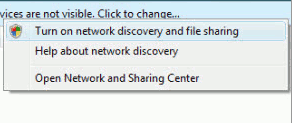
  • If they do not appear, you should get a message prompting to turn on Network Discovery and file Sharing. Click that security pop-up and select “make the network a private network”. In case, you may have to restart your computers.


Once you see the other computer in your Network computer window, just double click on it. If the other computer is password protected, you will have to enter the exact user name and password of that computer to get access of the shared folder.

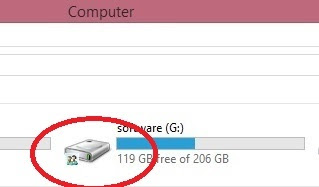
If you want to share some files or folder of a computer with the other computer on the network, right-click on that and select Share with > Homegroup. Even you can share a total drive by right-clicking on it.


 after this u have to check that specific drive is shared or not if shared then it looks like below mentioned with red circled symbol...


  • After connecting your 2 laptops or desktop using lan cable then follow the next steps.
  • Goto the mostwanted game folder and select "speed.exe".


      • Right click on the speed application and select properties.
      click on properties


        • Click on the compatibility tab and tick on the "Run the program in compatibility for" by default it is in the windows xp (service  pack 3) don't change this .

          compatibility tab

          •  After this click on the OK  button. 

          • Do this on the both pc's  and start playing.

          After starting the game, go to the lan option one of them have to create the game then the other have to just join the game.
          selected (.exe) file

          Thats it now you can enjoy the game.............................
          For Any Queries Contact me at : ghulamahmed123@hotmail.com

          Posted by Ghulam Ahmed Bin Saeed On 19:48 READ FULL POST


          Alexa is a web information company and maintains ranking data according to website performance. Performance factors include various things like a blog posting, traffic, reviews etc. These performance factors decide your website overall global and local rankings. Alexa global ranking means popularity of a site from all over the World, and the local Alexa ranking means the popularity of site from the country from which the domain is being registered.


          alexa rank hack


          Alexa is given more priority after Google page rank. Many advertisers and visitors judge your blog by looking Alexa rank. So it’s Good to have the Alexa rank to increase your blog popularity and income.  Here I am going to show you best legal and excellent ways to increase alexa rank


          Ways to Increase your alexa ranking

          1). Claim Your Site in Alexa:

          To gain full control claim your site on www.alexa.com this will help others to know about your site and helps to rank better.

          2). Install Alexa ToolBar on All Your Browsers:

          Alexa is measured by the hits which pass from their system . So you need to install Alexa tool bar  in all your browsers and also tell your friends ,visitors and members of your blog to install Alexa tool bar.

          3). Add Alexa widget on your blog or Site:

          You can not tell all your visitors to intsall Alexa tool bar so the best way is to use Alexa widget on your blog or site for good ranking. This helps advertisers to know about your site and there by it increases revenue of your blog.

          4). Make Browser Startup URL to Your Site URL:

          Yes, change your browser default startup url to your site url. If you are using google crome. Google crome default startup url is www.google.com. you need to change this by going to crome setting page.

          5). Publish Quality content:

          As we always believe that Content Is king. if you  have good content then you can generate automatically backlinks. If you don’t have any good article to publish then don’t publish weak and useless article.

          6). Write a Review about Alexa.com:

          This is the great tip to  increase alexa rank . Write a review about Alexa on your blog and link it to Alexa.com
          Note: If you started your blog recently then don’t write about How to increase Alexa rank- As you have started  blog recently if you write this article many visitors will take that in negative way. So its better to write What is Alexa rank? How to install Alexa widget on your blog

          alexa rank hack

          7). Comment On other Niche Blogs:

          Comment on commluv enabled blogs  and other blogs which are related to your niche. Commenting on others blog you can generate more backlinks very easily. and getting back links form good website will definitely increase Alexa rank. Don’ forget that Alexa will also include back links for measuring rank.

          8). Use Social networking sites:

          One of best way to get traffic and increase Alexa rank for a newbie is use of social networking sites like facebook. stumbleupon, Digg and reddit. share your contents on these sites. But Remember don’t share as a spammer.

          9). Review about your Blog on Alexa:

          Ask your friends, visitors to write a review on alexa, a good review about your site onalexa.com can increase alexa rank.

          10). Get target traffic:

          Get traffic form bloggers and tech related people this will helps you  to get good Alexa rank.

          11). Write new content regularly:

          It’s good to update your blog regularly by writing new article. but remember  you always need to provide good quality then Alexa will boost like anything.
          Posted by Ghulam Ahmed Bin Saeed On 05:32 READ FULL POST
          • RSS
          • Delicious
          • Digg
          • Facebook
          • Twitter
          • Linkedin
          • Youtube

          Advertisement

          Sample Text

          Unordered List