Showing posts with label smart phones and tabs. Show all posts
Get Quality Backlinks
ghulamahmedbinsaeed.blogspot.com
Backlinks are very important for every Blog or Websites. You can get quality Backlinks by commenting on high PR sites, Joining forms and community sites, joining question and answer websites, guest posting, submitting article to social bookmarking and social networking websites. There are so many other ways also available on the internet to get Quality Backlinks.

Why it is required to get quality Backlinks from High PR website?

Getting quality Backlinks from the high PR websites help blogs to improve page rank easily. That’s why every blogger want to link the blog or website to high PR websites.
When you create a link, it can be a Dofollow or Nofollow link. There are two questions frequently asked by bloggers.

What is a Dofollow or Nofollow link? 

How to check whether the link is Dofollow or Nofollow?

How to Get Top 5 Quality Backlinks in 15 Minutes?

There are so many high PR-9 websites available to get quality Backlinks but here I have listed 5 websites from where you can get quality Backlinks in just 15 minutes.

1) Google+  PR-9         

As you know that Google+ is one of the best and leading social media network who is on the top of the list with PR-9 after Google PageRank Update on 06th Dec 2013.
Google is known for his Name & Fame, so it provides Nofollow as well as Dofollow links.

How to get Dofollow link from Google+ towards the blog?

Step-1:

Log in to your Google+ Account (Create a new account if you don’t have)

Step-2:

Go to your profile page > Click on About Section

Step-3:

Now scroll down to Links and click on Edit option.
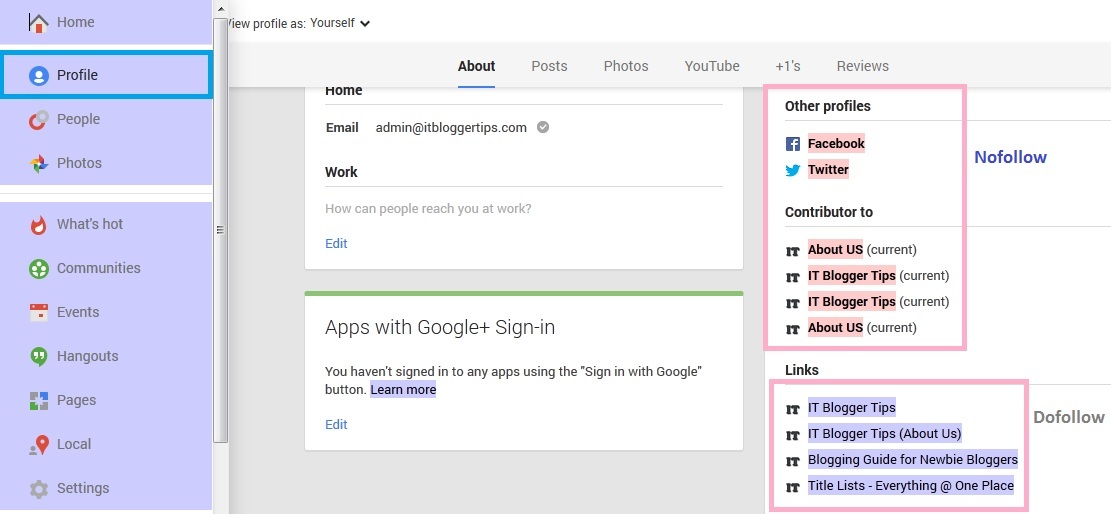
Add your links here and these links will be Dofollow links. You can see in below snapshot, the links which are highlighted in light pink color are Nofollow and the links which are highlighted in light grey color are Dofollow.
Google + nofollow dofollow
ghulamahmedbinsaeed.blogspot.com

2) YouTube           PR-9

YouTube is the best website who gives you PR-9 NoFollow as well as DoFollow Backlinks.
You can easily add your blog or website link in the Description or in the About section, but these are considered as NoFollow Backlinks.
When you add your website or blog URL to the “Associated Website” tab then you get DoFollow backlink on YouTube.

How to get DoFollow Backlink on YouTube?

First verify your account using the link (youtube.com/verify) and submit your website to Google Webmasters. (If you have not submitted to your website to Google Webmasters, Click Here)
After verification, Login to your YouTube Account using Gmail credentials.
Go to Channel Setting > Click on View Additional Features (youtube.com/features)
Now add your website on “Associated Website” under Advanced section.
The message should appear as SUCCESS.
YouTube
ghulamahmedbinsaeed.blogspot.com

3) Adobe      PR-9

Adobe.com is the best PR-9 website that gives you NoFollow Backlinks to your website or blog.

How to get No-follow Backlinks from Adobe.com?

First sign up with Adobe.com website.
An email will be sent to your email address to confirm the subscription. Just confirm your subscription and create an awesome profile.
Note: There is no option to put your website link at your profile page.
Visit to Adobe Forum and write here original problem with your blog’s URL.
This is the only way to get Backlink from Adobe.

4) Mozilla.org        PR-9

Everybody knows that Mozilla is the highly reputed website with PageRank 9.

How to get Dofollow quality Backlinks from Mozilla?

First register to addons.mozilla.org/En-us/firefox/users/register
Fill the complete details along with your website homepage and click on Register button.
An email will be sent to your e-mail address to confirm the subscription.
Confirm your activation and login to check out your profile page.
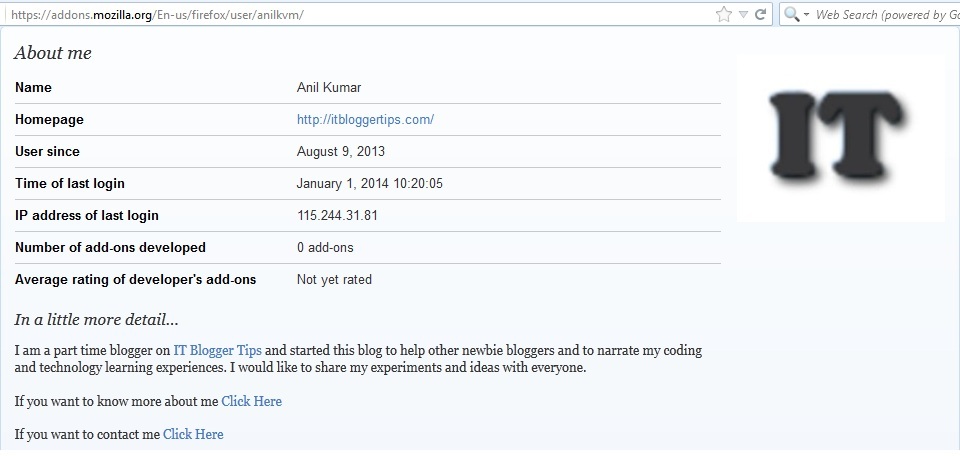
Mozilla Firefox
ghulamahmedbinsaeed.blogspot.com

5) Opera.com        PR-9

Open Opera website and click on Sign Up button and fill the registration form.
An email will be sent to your e-mail address to confirm the subscription. Once you confirmed the subscription, you can create your profile page just like Mozilla.
Opera gives you NoFollow Backlink.

Bonus: Quality Backlink from PR-8 Website

6) Yahoo Answers!          PR-8

This is best choice to get quality Backlinks on your website as well as on your posts too.
Join Yahoo Answers and become regular visitor to give answer of questions and put the link of your website as a reference to get quality Backlink and huge visitor too.
Yahoo Answers! gives you only NoFollow link but it is good for Domain Authority.
If you liked this article then spare 5 secs to share with your friends and colleagues.
Posted by Ghulam Ahmed Bin Saeed On 08:03 READ FULL POST


OUR TAKE ON PREMIUM TOUCH
Powerful yet portable, the entertainment-optimized Satellite® P50 series laptop provides an elegant touchscreen 
PC experience with Windows® 8. With a 15.6” diagonal, Full HD, TruBrite® display, Harman Kardon® speakers,
modernized design, an exquisite, frameless, LED-backlit keyboard and many other premium features, this laptop isideal for work or play.


15.6” Satellite P50 Series Laptops


ENTERTAINMENT TO GO.
With the Satellite® P50 laptop’s Full HD, TruBrite® display, every movie, game and photo will come to life with 
amazing color, clarity and contrast. It also offers DTS Studio Sound™ with premium harman/kardon® stereo 
speakers and Slipstream port technology that reduces distortion and creates a more precise, rich sound for all 
your movies and music. Plus, you’ve got a built-in DVD drive, availability of NVIDIA® GeForce® discrete graphics1 
and Ultra HD (3860x2160) HDMI® output so you can splash your movies and games on the latest 4K TVs to enjoy 
four times the image resolution of Full HD1 content. It’s a sight to see.


THE POWER OF TOUCH.
Good thing this PC comes with a generous 15.6” diagonal, Full HD, TruBrite®, multitouch1 display, enabling 
you to touch your way to greater freedom, productivity and mobility. You’ll enjoy movies, apps, games and multitasking
in a whole new way—and wonder how you ever got by without touch convenience before.

NEW, MODERN DESIGN.
The Satellite® P50 series laptop is a real beauty. Its modern, sophisticated style features a thinner Skyline 
design, plus edge-to-edge LCD glass (select models), rounded corners and cool Aluminum finish. Best yet, 
it’s compact and perfectly portable, so you can have all the laptop features you love, wherever you go.

POWER AND PERFORMANCE—IN ONE.
Equipped with performance-class technology components, the Satellite® P50 laptop helps you work, play and 
multitask faster thanks to powerful Intel® Core™ processors. You’ve also got all the storage space you need 
with multiple hard drive options and can finish demanding tasks quickly with up to 16GB of memory.


EXCLUSIVE TOSHIBA EXTRAS.
Like other Satellite® laptops, this PC offers plenty of features you’ll only get with Toshiba. That includes a full-sized,
 frameless, LED-backlit keyboard that helps you work or play in dimly lit environments, and a hard drive impact 
sensor that protects your important files during accidental bumps or drops. Plus, you can use this laptop as an 
audio dock and charger for your phone and tablet—even when the PC is off—with Sleep & Music and the new 
and improved USB 3.0 Sleep & Charge features.


SPECIAL FEATURES

LED Backlit Keyboard
When the room’s dim or the lights go down, you can keep right on typing thanks to these energy efficient keyboards.

USB Sleep-and-Charge
Power your smartphone, tablet and other USB-based portables even when your PC is off. 
Great for charging these USB devices while you are on the run.

Sleep-and-Music
Listen and enjoy music from your MP3 player through your laptop speakers even when your laptop is powered down.

Hard Drive Impact Sensor
Safeguard your data by ’parking’ the hard drive heads in the event of a drop or sudden movement.

TECH SPECS

Operating System : Windows 8
Processor   : Intel® Core™ i7-4700MQ (2.4GHz, up to 3.4GHz, 6M Cache)
Memory   : 4GB + 4GB DDR3
Hard Disk Drive  : 1TB (SATA) with 3D HDD motion sensor
Optical Disk Drive : Super-Mult Drive
Graphics   : Nvidia N14P-GS with Optimus Graphics 4GB
Network   : LAN: 10/100/1000
802.11 b/g/n
Bluetooth v4.0
Display   : 15.6" Full HD Clear SuperView with LED Backlight TFT Display (16:9), resolution 1920 x 1080 
Physical : Weight: approx: 2.58Kg
Audio   : Harman Kardon® speakers enhanced by DTS Studio Sound™ with Toshiba Sleep & Music
Battery   : 4-cell Battery
Lithium Ion Prismatic 43Wh
Camera   : 0.9M FF HD USB with Mic
Ports   : 2x USB 2.0 port
2x USB 3.0 port
HDMI Port
RGB
Card Reader

For Any Information and Details Contact me at: ghulamahmed123@hotmail.com or just leave a comment
Posted by Ghulam Ahmed Bin Saeed On 01:47 READ FULL POST


  • " Want a laptop with a great display, long battery life and strong performance? Dell’s revised XPS 13 is the real deal, and it’s even reasonably priced."


Two years ago, at CES 2012, a pleasant but rushed Dell rep met us outside the Sbarro in the Las Vegas Convention Center. He opened his briefcase and pulled out a black velvet case. Inside was the Dell XPS 13, a system that was among the first Ultrabooks to hit the market and among the first to employ carbon fiber in its chassis. Though the Dell rep went on to give us the lowdown on the XPS 13, he didn’t have to say a word. The system’s exceptional design spoke for itself.
Of course, that was two years ago, and the Ultrabook has changed since then. Prices have dropped, hardware has improved, and battery life has shot through the roof. Dell’s response has been to merely keep up with the pace of innovation. Hardware has improved, but the core chassis is the same system we first laid eyes on at CES two years ago.

This is a risky strategy, but Dell seems to think that there’s no need to fix what isn’t broken. Fortunately, Dell has at least dropped the price; the base model is now just $1,049. Meanwhile, our review unit, which includes a 1080p touchscreen, Core i5 processor and 8GB of RAM, is $1,299.
The question is, can this system’s aging design still hack it?

Old man XPS


The XPS 13 may be getting up there in age, but it’s aged pretty gracefully: Think modern day George Clooney versus current-day Val Kilmer (Sorry, Val. We loved you in Top Secret though!)
The XPS 13 is the pinnacle of design in the Ultrabook market.
The XPS 13 weighs three pounds, which is still respectable, and the chassis is no thicker than seven-tenths of an inch. On top of that, the XPS 13 simply looks good. The bezel is still thinner than most competitors, and the soft matte-black interior wards away fingerprints, yet feels great.
Dell’s success with this chassis is remarkable given how poorly the transition to carbon fiber has worked out for some other Ultrabooks, like Sony’s Vaio Pro 13. While Carbon fiber is technologically advanced, it often feels cheap when left on its own. Silver metal accents reinforce the XPS 13, so the notebook is rock solid no matter how it’s handled. Even the thin display allows only the slightest hint of flex.
Connectivity is a weak spot, however. There are only two USB 3.0 ports and mini-DisplayPort is the sole video output. A combo headphone/microphone jack rounds out the options. There’s no SD card or Ethernet, but 802.11ac Wi-Fi is supported.


Keyboard conundrum

Keyboard quality is an area where the XPS 13 hasn’t kept up with the pace of change. While it’s fine, with decent key feel and plenty of space, the keyboard lacks the pleasing, definitive key action found on the Apple MacBook Pro 13 with Retina or Lenovo ThinkPad Carbon X1.
Backlighting is standard and offers two brightness options. They’re fairly dim, and are superior when used in dark environments. Light leakage is a bit of an issue, however, as the LEDs beneath several keys have an unobstructed line-of-sight to the user.


Highs
  • Strong, attractive chassis
  • Thin and light
  • Great 1080p display with record-setting contrast
  • Excellent battery life
  • Minimal bloatware
Lows
  • Warm and loud under load
  • Limited connectivity
Dell XPS 13 Ultrabook front angle 2

Dell XPS 13 Ultrabook trackpad


For any help contact me at : ghulamahmed123@hotmail.com
Posted by Ghulam Ahmed Bin Saeed On 00:08 READ FULL POST
  • RSS
  • Delicious
  • Digg
  • Facebook
  • Twitter
  • Linkedin
  • Youtube

Advertisement

Sample Text

Unordered List