How to download and install Windows 8.1 for free.


Searching in the new Windows 8.1 Apps view

Windows 8.1 has been released. If you’re using Windows 8, upgrading to Windows 8.1 is both easy and free. If you’re using another operating system (Windows 7, Windows XP, OS X), you can either buy a boxed version ($120 for normal, $200 for Windows 8.1 Pro), or opt for one of the free methods listed below. To download and install Windows 8.1 for free, follow the guide below.

How to download Windows 8.1 for free

Windows 8.1 boxIf you don’t want to wait for October 17 or 18, there are two options for downloading Windows 8.1: You can obtain a copy (and a license key) from a friend/colleague with an MSDN, TechNet, or DreamSpark (student) subscription, or you can download a Windows 8.1 RTM ISO from your favorite file-sharing website (The Pirate Bay, Mega, etc.)
While we’re not going to write a guide on how to obtain Windows 8.1 RTM from non-official sources, we will at least tell you to check the SHA-1 hash of the ISO that you download to make sure that it’s legitimate. If you hit up the MSDN Subscriber Downloads page, and then click Details under the version that you’ve obtained from elsewhere, you’ll find the SHA-1 hash. If you then use File Checksum Integrity Verifier (FCIV) on the ISO, the hash should match. If it doesn’t, assume the ISO has been compromised and download another. (But do make sure that you’re checking the right SHA-1 hash on the MSDN website; your ISO might be mislabeled).
The other easier, and completely legal, option is to download the Windows 8.1 Preview from Microsoft. It’s not as snappy as the final (RTM/GA) build, though, and has quite a few bugs/missing features. Bear in mind that if you go down this road, upgrading to a real version of Windows 8.1 will require a few more steps (discussed in the next section).

How to install Windows 8.1 for free

Once you have the Windows 8.1 ISO on your hard drive, the installation process is painless. Before you begin, you should consider backing up your important files and documents, but it’s not really necessary. You should also ensure that you have plenty of free hard drive space (20GB+).
Windows 8.1 setup processIf you’re already running Windows 8 and you downloaded the RTM ISO from somewhere other than the Windows Store, you can install Windows 8.1 by mounting the downloaded ISO in Explorer by double-clicking it, and then running the installer. If you’re on Windows 7, XP, or (bless your soul) Vista, you’ll need to burn the ISO to a USB thumb drive or DVD, or mount the ISO using a third-party virtual drive tool, like Magic ISO.
If you already have Windows 8, and you waited for the official release date, installing Windows 8.1 is as simple as visiting the Windows Store and downloading the free update.
In both these cases, the upgrade process should be very smooth, with your apps and settings fully preserved. If you upgrade from Windows 8.1 Preview, however, you will lose your installed apps, unless you first run a cversion.ini removal utility.
Once you’ve installed Windows 8.1, you should check out our extensive collection ofWindows 8.1 tips and tricks, and be sure to check our Windows 8.1 review and hands-on impressions to ensure that you’re making the most of all the new features.
Posted by Ghulam Ahmed Bin Saeed On 07:56 READ FULL POST
I know, I know… starting a blog can be confusing.when I started my first blog, I knew absolutely nothing about blogs or blogging. I kept searching for information and “how-to” guides on Google, but they all required technical skills and I found them extremely difficult to follow.

By now, I’ve built and managed more than 30 different blogs, and during that time, I’ve learned a ton about blogging.
All I can say is that creating blogs is extremely easy and it does not require any coding skills (HTML). In fact, the whole process is somewhat automatic. So whether you are 20 or 70 years old, doesn’t really matter – you can still make it. Here’s my sample blog, which I made in less than 20 minutes. You can do that too; simply follow the steps below.
If you are still hesitating, I suggest you read my article titled “Reasons why you should start your own blog.”
P.S.: If you get stuck while setting up your blog, get in touch with me and I’ll help you out.

Shall we start?

1) DECIDE WHAT YOU ARE GOING TO BLOG ABOUT

The first thing you need to do is pick a blog topic. Is there anything you enjoy or are really passionate about? If there is, then start a blog about it. When I started my first blog, I was really interested in smartphones and new tech gadgets, so I picked that topic. It makes no sense to start a blog about something you have no interest in, while it’s much easier to write articles and posts about topics that you’re passionate about.
It’s even better when you have been interested in a specific field or an industry for a long time, because you are already an expert. However, if you don’t have any idea which topic or niche you want to write about, think about your hobbies or just start blogging about your daily activities, memorable moments or simply about everything.
P.S. If you already know your blog niche or topic, you can skip this step and move onto Step 2.

2) DECIDE WHICH BLOGGING PLATFORM TO USE, FREE OR SELF-HOSTED?

First of all, most of the blogs on the internet are made using the WordPress blogging platform. In fact, WordPress has been downloaded over 65 million times and is used by many popular blogs and websites.
Here’s why I think using WordPress is the best way to start your blog:
  • You can choose from many different layouts and free themes
  • You can easily write blog posts and add pictures/images to your blog
  • You are able to categorize your blog posts and create a custom menu
  • People can comment and share your blog
  • etc…

Free is not FREE…

Yes, you can create a free blog on a blogger.com or tumblr.com, but they are not actually free. And let me tell you why…
You are not able to get your OWN domain – Instead, you will get a sub-domain. My blog (startbloggingonline.com) has its own domain, but if I had decided to start a blog on blogger.com (for example), then it would look like startbloggingonline.blogger.com – a bit clumsy, isn’t it?
They are lacking of different themes/layouts and plugins – In other words, your blog will look really blank and boring. If you want additional themes or plugins to customize your blog, you have to pay… a lot.
You have NO control over your blog – Your blog is hosted on another site, thus you are not the “owner” of this property. If moderators decide that your blog does not fit with their policies (which can happen quite often), they can actually delete your blog without any warnings. In short, all your hard work and time spent on the blog will be vanished within seconds.

You are not able to earn money via blogging – Yes, you CAN make money with blogging, lots of people are. However, If you ever decide to earn money with your blog, you are unable to do it on a free blog. They simply don’t allow you to do that. Even if they do, they want their own cut, which is usually 50%.
However, if you are on a budget and don’t plan to blog more than few months then definitely start with a free blog. A self-hosted blog on your own domain (yourblog.com) is by far the better option. It gives you full control over your blog and you’ll look more professional. It’s also a great choice for people who want to blog long-term, share their knowledge, become a blogger and earn some money from it.

WHAT IS THE COST OF STARTING A SELF-HOSTED BLOG ON YOUR OWN DOMAIN?

Not much. You will need a domain that will cost approximately $10 a year and a hosting (service that connects your blog to the internet) is around $4 – $7 a month (less than a movie ticket). To sum this up, it’ll be around $50 a year. The good thing about self-hosted blog is that you don’t have to be committed. If you feel that blogging is actually not your cup of tea, you can cancel anytime and many services have 90 days money back guaranteed as well.

3) CHOOSING A DOMAIN & HOSTING, AND SETTING UP A WORDPRESS BLOG ON YOUR OWN DOMAIN

If you decided to go with a self-hosted blog on your own domain, smart choice.
Finding a great domain name can take a while, but it’s worth it. I suggest you pick something brandable and easy to remember. Let’s say you are planning to start a fashion blog.www.fashionblog2013.org or www.all-about-latest-fashion-trends.com is not a great idea. But why?
People simply cannot remember long domains and when they want to return to your blog they are likely to forget your domain name. It’s much better to choose something memorable, such aswww.fashionologie.com, www.vivalafashion.com or something similar. As an alternative, you can just use your name, for example: www.MikeWallagher.com
In short, your domain name should be:
  • Catchy
  • Easy to remember
  • Unique

WHERE CAN I GET A DOMAIN NAME AND BLOG HOSTING?

I usually suggest people to get a domain and hosting from the same place, in that way you’ll save some money and time. In the past few years while I have been creating and managing blogs, I have discovered that there are very few reliable hosting companies.
To be more clear, I’ve used several hosting companies in the past. Just to mention some of them: Bluehost, Fatcow, Hostgator, Dreamhost. BUT… I wasn’t really satisfied with them. Their customer support wasn’t really professional and it took a lot of time to get in touch. Quite often my blog’s speed (page loading time) was ridiculously slow. The reason was quite simple (they aren’t that bad, actually): THEY WERE OVERSELLING their services. They focused on getting more and more new clients rather than improving their services, support and valuing their current customers.
One of the most reliable ones (also the one that I’m currently using) is Web Hosting Hub. Their service is quite cheap compared with others and they are well-known for their great customer support via email and phone (24/7). Web Hosting Hub is also good for beginners too, as they have a “1-Click-Blog-Installation” feature that is focused on WordPress blogs and websites. You simply click few buttons and your self-hosted blog on your own domain is ready.
Of course, you can use any other hosting company and I have included a tutorial on how to install your blog manually as well. If you decide to go with a different hosting company then make sure they offer unlimited bandwidth and unlimited disk space. That will help you to avoid problems later on.
You have two options to install your blog to your own domain:
  • A) With “One-Click-Installation” using WebHostingHub (You’ll get a domain from there as well).
  • B) Manually.
The One-Click-Installation is better for beginners or those who are trying to set up their first blog. If you are internet/computer savvy then have a look at the manual tutorial. Either way, you’ll get your blog online very quickly.

A) How to Set Up WordPress Blog using Web Hosting Hub (FOR BEGINNERS)

B) How to Set Up a WordPress Blog Manually to Any Host (ADVANCED)

…. and once you have completed the installation:

WRITING YOUR FIRST POST, CHOOSING NEW THEME AND PROMOTING YOUR BLOG

P.S. Two things:

1) If you found this tutorial helpful, feel free to share it below. It really means a lot to me!
Posted by Ghulam Ahmed Bin Saeed On 06:08 READ FULL POST
Project IGI 1 Game Free Download Full Version PC Game 

igi 1 download
http://ghulamahmedbinsaeed.blogspot.com/


Project IGI-1 Game Into is a tactical first-person shooter and Inner-loop Eidos Interactive Studios and developed by the December 15, 2000 is issued. The first computer game featuring realistic weapons and tactical combat situations is one. After his release due to a number of shortcomings mixed games such poorly the AI, lack of a mid-game save option, and the lack of multi player features, reviews, garnered. However, it sounds great before a proprietary game engine that was used in Innerloop Joint Strike Fighter Design and graphics by its use, thanks in part was praised for.
Plot: David Jones, the Joseph Priboi, a Russian arms dealer on a stolen nuclear warhead is believed to provide information that is sent to find. He helps Captain Harrison, apprehend Josef, he discovers that the brains of the operation is Josef's uncle Jach, whom Jones then attempts to apprehend instead is. They put a virus in Jach's communications center shows the location of the.


By Jach Priboi while Jones took the helicopter, he is shot by Ekk. Jones then clear the border and find his equipment. He then hijacks the train carrying Priboi and takes him in for questioning. You can learn about the involvement of Ekk, he sets out to catch him and find nuclear weapons.
Ekk escapes on her first meeting with Jones, but Jones nuclear warhead as well as looking after his second base hits.

Main Characters


David Llewellyn Jones - Jones is an agent for I.G.I. (Institute for Geo tactical Intelligence) and former British SAS operator. Players control him as the main character.
Anya - Anya is the contact at headquarters who directs Jones via's radio. She appears in the final mission to defuse the bomb.
Jach Priboi - Soviet Arms Dealer
Josef Priboi - Jach's Nephew
Ekk - a Russian woman who intends to destroy Europe by nuclear warfare.
Captain Harrison - commander of allied troops, which aid Jones in some missions, and an ex-Green Beret.


igi 1 download
http://ghulamahmedbinsaeed.blogspot.com/

igi 1 download
http://ghulamahmedbinsaeed.blogspot.com/


For any queries Contact me at :- ghulamahmed123@hotmail.com
Posted by Ghulam Ahmed Bin Saeed On 22:47 READ FULL POST

Grand Theft Auto: Vice City is a 2002 open world action-adventure video game developed by Rockstar North (formerly DMA Design) and published by Rock star Games. It is the second 3D game in the Grand Theft Auto series and sixth original title overall.


It was released in North America on 29 October 2002 for the PlayStation 2 and was later ported to the Xbox, and Microsoft Windowsin 2003. It was made available on Steam on 4 January 2008, and on the Mac App Store on 25 August 2011.[3] Vice City was preceded by Grand Theft Auto III and followed by Grand Theft Auto: San Andreas.
Grand Theft Auto: Vice City draws much of its inspiration from 1980s American culture. Set in 1986 in Vice City, a fictional city modeled after Miami, the story revolves around Mafia hitman Tommy Vercetti, who was recently released from prison. After being involved in a drug deal gone wrong, Tommy seeks out those responsible while building a criminal empire and seizing power from other criminal organizations in the city. The game uses a tweaked version of the game engine used in Grand Theft Auto III and similarly presents a huge cityscape, fully populated with buildings, vehicles, and people. Like other games in the series, Vice City has elements from driving games and third-person shooters, and features an open world gameplay that gives players more control over their playing experience.
Upon its release, Vice City became the best-selling video game of 2002. Until July 2006, Vice City was the best-selling PlayStation 2 game of all time. Vice City also appeared on Japanese magazine Famitsu's readers' list of the favorite 100 videogames of 2006, the only fully Western title on the list.[4] Following this success, Vice City saw releases in Europe, Australia and Japan, as well as a release for the PC. The game was later bundled with its predecessor in the Xbox compilation Grand Theft Auto: Double Pack; both games were later bundled with GTA: San Andreas in Grand Theft Auto: The Trilogy. Vice City's setting is also revisited in Grand Theft Auto: Vice City Stories, which serves as a prequel to events in Vice City. In December 2012, Rockstar released Vice City for iOS and Android platforms as celebration for the game's 10th anniversary.


Tommy Vercetti, a loyal former member of the Forelli Family, has just been released in 1986, serving 15 years for killing 11 men in the Harwood District of Liberty City in early 1971, earning him the nickname The Harwood Butcher.[5] Tommy's old boss, Sonny Forelli, fears that Tommy's presence in Liberty City will heighten tensions between the other Liberty City families and bring unwanted attention to his organization's criminal activities


Download Need For Speed Vice City For Free :- Click here

Posted by Ghulam Ahmed Bin Saeed On 02:31 READ FULL POST
Well,most  of them think  WLAN is only used for internet because of those commonly know  tag"WIFI enabled"...But there are many more  possibilities...


 Connect Two Windows 7 Computers On LAN Using Ethernet Cable and enjoy nfsmw


 Step 1. In order to start the connection, you’ll have to assign different IP address for both computers. To change the IP address of your computers for the LAN connection, you should make changes in the LAN adapter settings.
  •     Open Control panel from the start menu and click on Network and Internetand click on Network and Sharing center.
  •     From the left sidebar, click on Change adapter settings.
  •     Under the Network connections window select the appropriate icon for your LAN adapter and right-click on it, then choose Properties.


  • A Local Area Connection Properties box appears.


  •  Under the Network tab select Internet Protocol Version 4 (TCP/IPv4) and click on the Properties button.
  •     Now set the addresses as mentioned below in each computer and click OK.

At the first computer ( say, Computer 1):

IP address:       192.168.0.1

Subnet mask:  255.255.255.0

At the second computer ( say, Computer 2):

IP address:       192.168.0.2

Subnet mask:  255.255.255.0


Step 2. Now, connect one end of the cable into the Ethernet port of Computer 1 and the other end with the same of the Computer 2 and apply the following steps in both the computers.
  • Restart each computer. It does not matter which computer you restart first. After starting both the computer, double-click on the Computer icon at the start menu and then click on Network from the left side of the explorer window.
  • In the computer 1, you should see an icon denoting your second computer’s name under the Network window. Similarly, you can see that the first computer has been appeared under the Network window of your second computer.
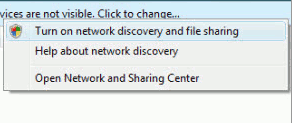
  • If they do not appear, you should get a message prompting to turn on Network Discovery and file Sharing. Click that security pop-up and select “make the network a private network”. In case, you may have to restart your computers.


Once you see the other computer in your Network computer window, just double click on it. If the other computer is password protected, you will have to enter the exact user name and password of that computer to get access of the shared folder.

If you want to share some files or folder of a computer with the other computer on the network, right-click on that and select Share with > Homegroup. Even you can share a total drive by right-clicking on it.


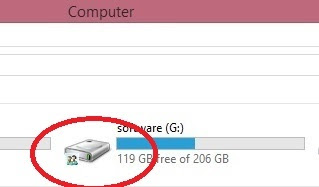
 after this u have to check that specific drive is shared or not if shared then it looks like below mentioned with red circled symbol...


  • After connecting your 2 laptops or desktop using lan cable then follow the next steps.
  • Goto the mostwanted game folder and select "speed.exe".


      • Right click on the speed application and select properties.
      click on properties


        • Click on the compatibility tab and tick on the "Run the program in compatibility for" by default it is in the windows xp (service  pack 3) don't change this .

          compatibility tab

          •  After this click on the OK  button. 

          • Do this on the both pc's  and start playing.

          After starting the game, go to the lan option one of them have to create the game then the other have to just join the game.
          selected (.exe) file

          Thats it now you can enjoy the game.............................
          For Any Queries Contact me at : ghulamahmed123@hotmail.com

          Posted by Ghulam Ahmed Bin Saeed On 19:48 READ FULL POST
          • RSS
          • Delicious
          • Digg
          • Facebook
          • Twitter
          • Linkedin
          • Youtube

          Advertisement

          Sample Text

          Unordered List